
Guide · Technical SEO
Fridica for Developers: Audit Before You Hand the Site to a Client
Your website looks finished, the client is waiting, and launch day is close. Before you hand it over, use a structured audit to catch recurring metadata, crawlability and page-level issues — then re-scan after the fixes.
The website is finished.
The homepage looks good.
The contact form works.
Mobile has been checked.
The client is already asking:
“Can we launch today?”
And somewhere in the back of your mind is another question:
“What did I forget?”
Every developer knows that feeling.
A website can look completely finished in the browser while still exposing small technical and structural problems underneath.
A missing canonical tag.
A title copied across several pages.
A template that forgot to output meta descriptions.
A heading structure that became strange after three rounds of client edits.
A sitemap that exists but is not referenced where you expected.
None of those necessarily makes the website look broken.
But they are exactly the kind of things worth checking before you say:
“Done.”
Think of the audit as one more QA layer
Fridica is not a replacement for normal website testing.
You still need to check:
- responsive layouts;
- forms;
- navigation;
- accessibility;
- browser behavior;
- performance;
- content;
- and whatever the project specifically requires.
But there is another useful question:
What does the public website actually expose after all of that code, CMS configuration and templating has finished doing its job?
That is where an external website audit becomes useful.
Your code can be correct while the rendered page is wrong
This happens more often than developers like to admit.
You may have written the correct logic.
But then:
- a CMS field is empty;
- a template branch behaves differently;
- a plugin overrides metadata;
- a deployment uses an older configuration;
- a page type follows another layout;
- or the final HTML simply does not contain what you expected.
The browser does not care what the code was supposed to output.
Neither does a crawler.
The rendered public page is the thing that exists.
A practical pre-handoff workflow
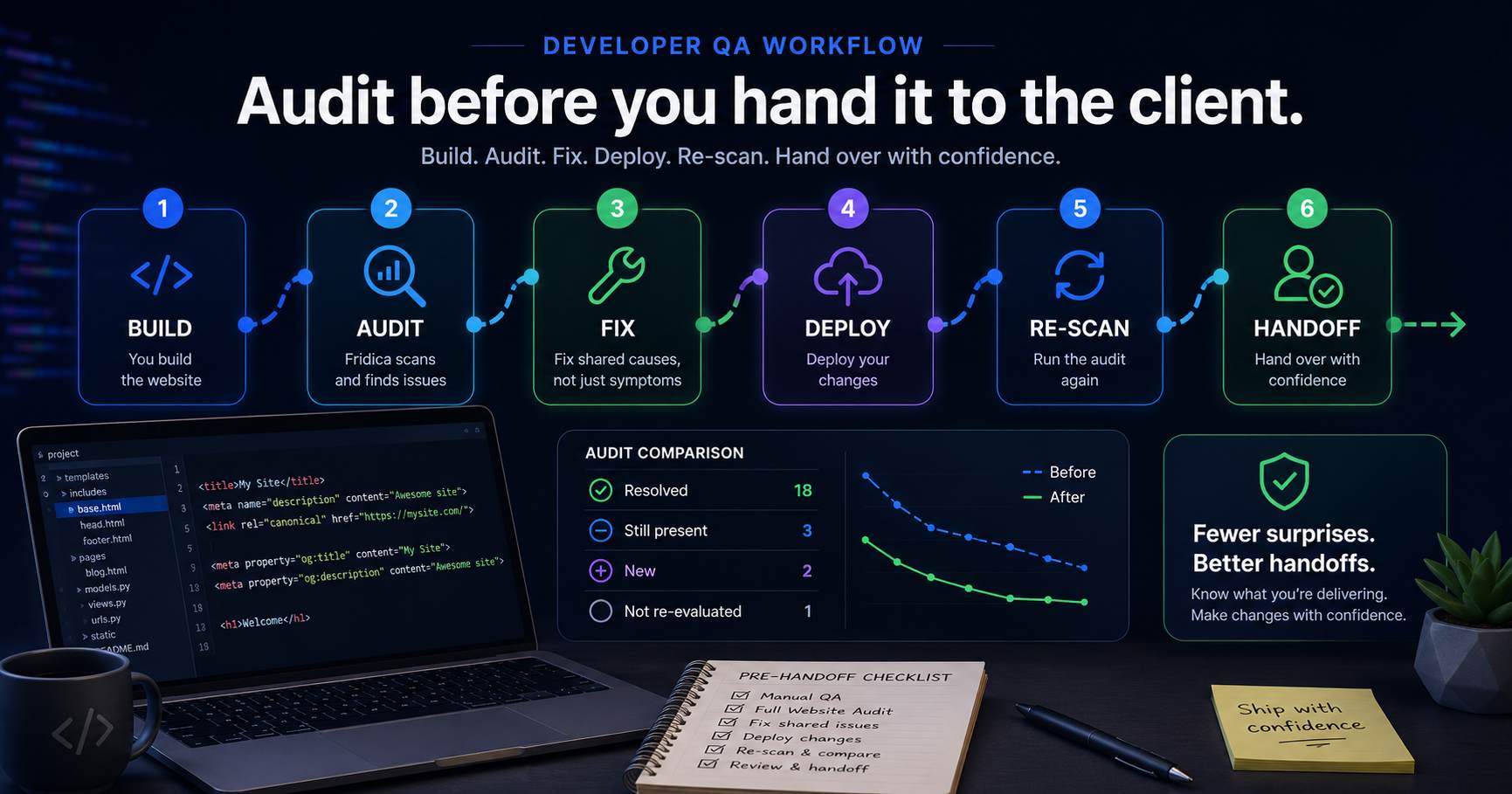
A simple developer workflow with Fridica can look like this:
- Finish the website.
- Run your normal manual QA.
- Run a Full Website Audit.
- Look for site-wide and repeated findings first.
- Inspect affected URLs and evidence.
- Fix shared causes where possible.
- Deploy the changes.
- Run another audit.
- Compare the results.
- Hand the site over with fewer surprises.
It does not need to become a huge extra process.
The point is to give yourself one structured check between:
“It looks finished.”
and:
“It is ready to hand over.”
Start with repeated findings
For developers, prevalence is often one of the most useful audit signals.
Imagine Fridica reports:
Missing meta description — 23 of 24 pages affected.
Your first reaction probably should not be:
“I need to edit 23 pages.”
A better question is:
“Why are 23 pages doing the same thing?”
That immediately sends you toward likely shared causes:
- a base template;
- a theme component;
- a metadata helper;
- a CMS field mapping;
- an SEO plugin configuration;
- or some other reusable rendering logic.
This is where an audit can save development time instead of creating more work.
One root cause can create dozens of findings
Suppose every page is missing a canonical URL.
The audit may tell you that 30 pages are affected.
But that does not necessarily mean you have 30 separate problems.
You may have:
one missing line in one shared template.
That distinction matters.
A useful audit should help you see the pattern instead of making every affected page look like an unrelated task.
Look at affected URLs before touching the code
Representative URLs can quickly tell you whether the problem is truly site-wide or concentrated in one content type.
For example:
- all blog posts fail;
- service pages pass;
- the homepage behaves differently;
- archive pages expose another template;
- or one section of the CMS is generating inconsistent metadata.
That can point directly toward the part of the project you need to inspect.
Before opening your editor, understand the pattern.
Titles and descriptions are easy to overlook during development
Developers naturally spend more attention on:
- layout;
- components;
- database logic;
- forms;
- authentication;
- APIs;
- performance;
- and deployment.
Then launch day arrives and twelve pages still say:
“New Page”
or share the same title.
It happens.
An audit gives you a final structural pass over things that are easy to miss while building.
Canonical problems often belong to the template layer
Canonical findings are especially interesting for developers because they frequently reveal shared implementation problems.
If one page is missing a canonical URL, inspect the page.
If every page is missing one, inspect the system.
Depending on the stack, that might mean:
- a WordPress theme;
- a Django base template;
- a layout component;
- a head-management library;
- a CMS integration;
- or metadata generation logic.
That is a much more useful development clue than simply seeing a red badge.
Heading issues can reveal component problems too
Heading hierarchy is another place where modular development can produce unexpected results.
A component may contain its own heading.
A CMS editor may add another.
A landing-page template may reuse the same section twice.
Individually, every piece looks reasonable.
Together, the final document structure may not.
The audit sees the final page.
That makes it useful as a check against assumptions made inside individual components.
Do not treat every warning as a development emergency
This matters too.
An audit can find many things.
Not every finding deserves to block launch.
Before delaying a handoff because one badge exists, look at:
- severity;
- scope;
- affected-page count;
- available evidence;
- the purpose of the page;
- and the actual effort required.
A good pre-launch audit should reduce uncertainty.
It should not create panic.
Create a Fix Plan when the report gets long
Sometimes the first audit of a new website is beautifully boring.
Sometimes it is not.
If you get a longer list of findings, Create My Fix Plan can help organize the deterministic audit results into a practical order.
For example:
Start here
- site-wide canonical configuration;
- duplicate titles;
- important missing metadata.
Quick wins
- isolated heading issues;
- weak link text;
- straightforward page-level corrections.
Can wait
Valid lower-priority improvements that do not need to delay the project unnecessarily.
The plan does not create new findings.
It helps organize what the audit already detected.
Use Fix Assistant as guidance, not as a code deploy button
For supported findings, Fridica can also provide a reviewable fix suggestion.
That may be useful when you want a quick second opinion on:
- a title;
- a meta description;
- a heading structure;
- link text;
- canonical implementation;
- or supported structured-data signals.
But Fridica does not write directly into your production website.
That is intentional.
As a developer, you still decide:
- where the change belongs;
- whether the suggestion fits the architecture;
- how it should be implemented;
- and when it should be deployed.
AI can help with the suggestion.
You own the implementation.
The most important step comes after deployment
You found the issue.
You changed the template.
You pushed the update.
Done?
Not quite.
Run another audit.
This is where Fridica can become useful as a lightweight QA loop rather than a one-time report.
Compare before and after
The comparison can show whether findings are:
- Resolved;
- Still present;
- New;
- Not re-evaluated.
Suppose you fixed the canonical template.
The next audit shows:
Canonical issue — Resolved.
Great.
Now suppose it shows:
Canonical issue — Still present on 4 pages.
That is useful too.
Maybe those four pages use another template.
Maybe a plugin overrides them.
Maybe you have discovered a second rendering path.
That is exactly the kind of thing you want to know before client handoff.
A re-scan can also reveal regressions
The comparison is not only about proving that one issue disappeared.
A new audit may also detect something that was not present before.
For example:
You change the shared head template to fix canonical URLs.
Canonical URLs are now correct.
But somehow page titles disappeared on one template.
That is why the New category matters.
Fixes can have side effects.
A second audit gives you another chance to catch them.
This is especially useful on WordPress projects
WordPress websites often combine several layers:
- theme behavior;
- Gutenberg blocks;
- page builders;
- SEO plugins;
- custom fields;
- third-party plugins;
- and content entered by the client.
Each individual part may behave correctly.
The final public page is where everything meets.
An external audit can catch situations where those layers do not quite agree.
It works for custom applications too
The same principle applies if you build with Django, Laravel, PHP, React, static generators or another stack.
Fridica is looking at the public website.
It does not need to know whether the title came from:
- a Django template;
- a WordPress plugin;
- a database field;
- a JSON file;
- or three functions you wrote at two in the morning.
It cares about what the page ultimately exposes.
Keep a baseline before major changes
Fridica can also be useful before a redesign, migration or major technical change.
Run an audit first.
Keep it as a baseline.
Then make the changes.
After deployment, run another audit and compare.
That gives you a structured way to ask:
“Did we accidentally lose something during the rebuild?”
For migrations, that can be especially valuable.
What Fridica does not replace in developer QA
Fridica is one layer.
It does not replace:
- automated application tests;
- browser testing;
- manual functional QA;
- accessibility testing;
- performance profiling;
- security testing;
- analytics validation;
- or developer judgment.
And it cannot tell you that:
- Google has indexed the page;
- rankings will improve;
- traffic will increase;
- or AI search systems will cite the website.
It checks the public website signals covered by its audit rules.
That is useful precisely because the boundary is clear.
A client-friendly benefit
There is another small advantage.
A structured audit can make technical conversations with clients easier.
Instead of:
“I changed some SEO stuff in the template.”
you can say:
“The initial audit found the canonical issue across all 24 pages. We corrected the shared template, re-scanned the site, and the current audit no longer detects that finding.”
That is much clearer.
It turns invisible technical work into something easier to explain.
A simple developer handoff checklist
Before you hand the site to the client:
- Check the website manually.
- Run the Full Website Audit.
- Review the highest-impact and widest-scope findings.
- Inspect affected URLs.
- Look for shared root causes.
- Fix what should reasonably be fixed before delivery.
- Deploy.
- Re-scan.
- Compare against the earlier audit.
- Review unresolved and new findings.
Then hand it over.
Preferably before the client sends:
“Just one tiny change...”
We cannot help you with that part.
The short version
A website being visually finished does not mean every technical signal is exactly where you expect it to be.
Before client handoff:
Audit it.
Look for repeated issues.
Find the shared root causes.
Make the changes.
Then audit it again.
The goal is not a ceremonial 100/100 score.
The goal is to know what you are actually delivering.
Build. Audit. Fix. Re-scan. Hand over with fewer surprises.
Keep learning
Related Technical SEO guides
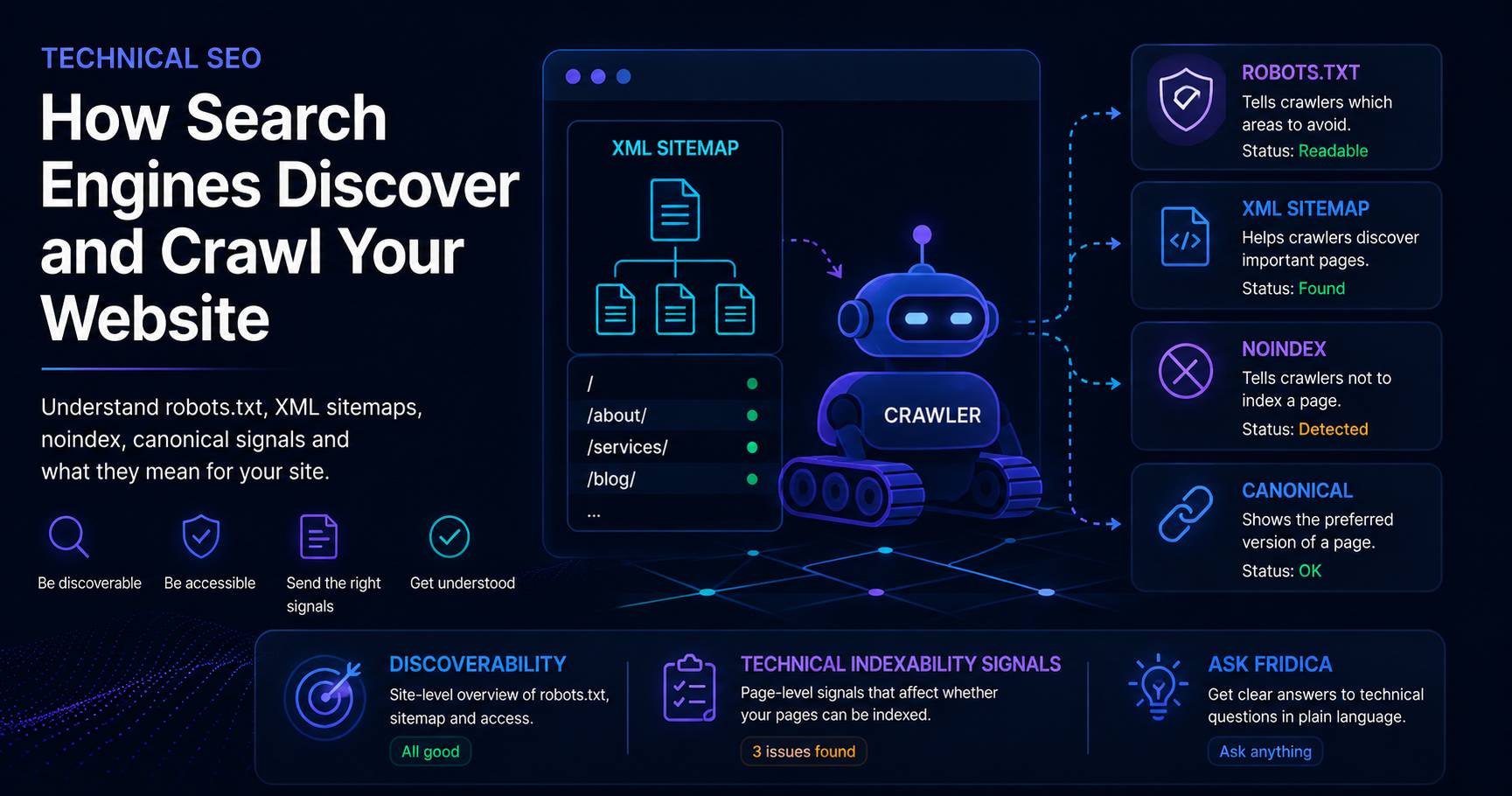
How Search Engines Discover and Crawl Your Website
Learn how crawlers find pages, what robots.txt and XML sitemaps actually do, and how to understand Fridica’s Discoverability and Technical Indexability Signals.
Read guidePut this into practice
See what applies to your page.
Start with a one-page review, then run a full site audit when you are ready.